Device Details Pane
In the Devices page, select the check box adjacent to the device whose details you wish to view.
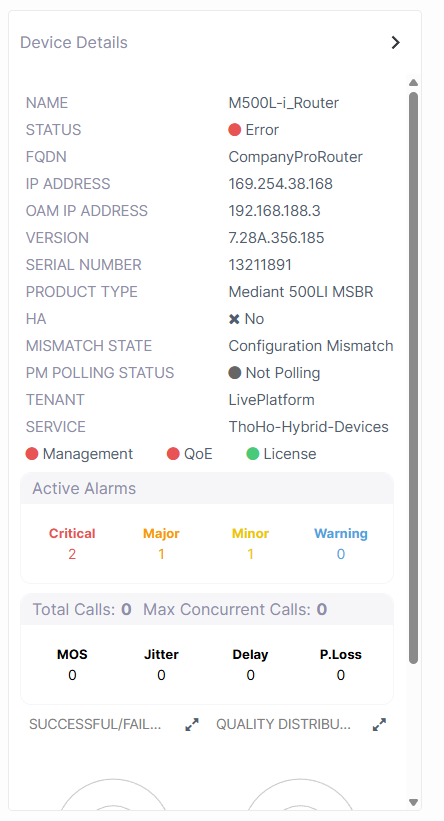
The table below describes the parameters in the Device Details.
|
Component |
Status |
|||||||||
|---|---|---|---|---|---|---|---|---|---|---|
|
Name |
Name of the device. |
|||||||||
|
Status |
Device Status |
|||||||||
|
FQDN |
Fully Qualified Distinguished Name (FQDN) |
|||||||||
|
IP Address |
Public IP Address of the device. |
|||||||||
|
OAM IP Address |
OAM Interface of the device |
|||||||||
|
Version |
Device firmware version |
|||||||||
|
Serial Number |
Device Serial number |
|||||||||
|
Product Type |
Device Product type |
|||||||||
|
HA |
Indicates whether HA is enabled on the device |
|||||||||
|
Mismatch State |
Indicates whether the latest ini configuration file on the device matches the configuration file that is loaded to Live Platform Software Manager. |
|||||||||
|
PM Polling Status |
Indicates whether polling is activated on the device for Performance Monitoring. |
|||||||||
|
Tenant |
The name of the Service Provider tenant. |
|||||||||
|
Service |
The name of the tenant service. |
|||||||||
|
Last Restart Time |
The last time that the device was restarted. |
|||||||||
|
|
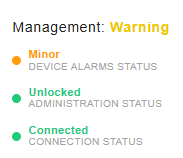
Management status monitors the following:
|
|||||||||
|
|
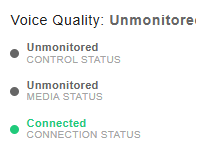
Voice Quality status monitors the following:
|
|||||||||
|
|
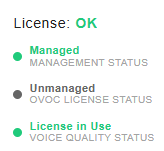
License status monitors the following:
|